
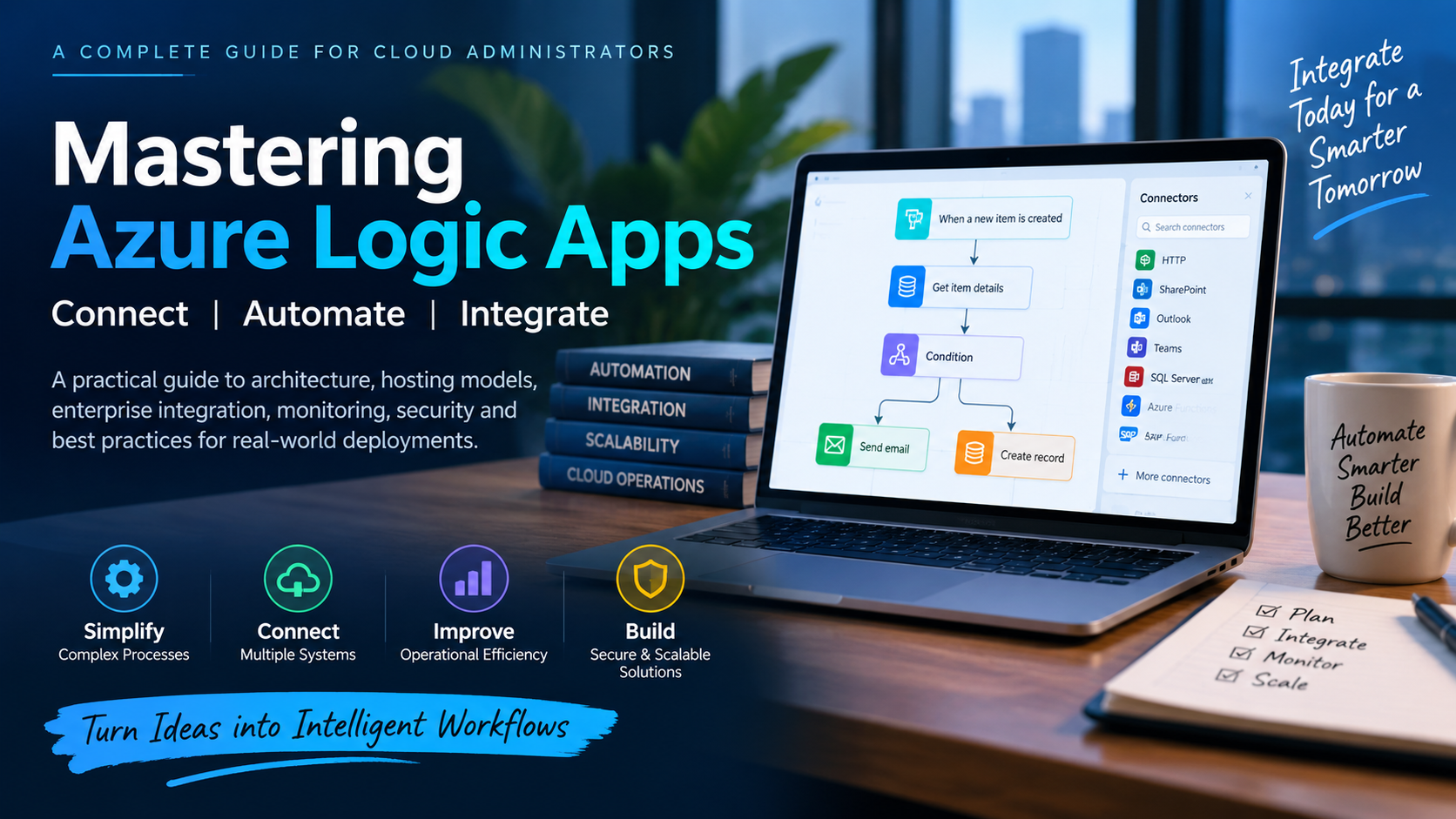
Mastering Azure Logic Apps: A Comprehensive Guide for Cloud Administrators
Mastering Azure Logic Apps: A Practical Guide for Cloud Administrators
Azure Logic Apps helps organizations connect applications, automate business processes, and build integration workflows without maintaining a traditional integration platform. This guide explains the architecture, hosting options, enterprise integration capabilities, monitoring approach, security practices, and design considerations administrators should understand before running Logic Apps in production.
Introduction: Why Azure Logic Apps Matters
Modern enterprise environments rarely operate within a single application or cloud platform.
Business data may be distributed across Microsoft 365, Azure services, SaaS platforms, databases, SAP systems, APIs, file servers, and applications running inside private networks. Connecting these systems traditionally required custom integration code, middleware, scheduled jobs, and considerable operational effort.
Azure Logic Apps provides another approach.
Logic Apps is Microsoft’s cloud-based workflow and integration service. It enables teams to build workflows that connect applications and services using triggers, actions, connectors, conditions, loops, transformations, and other orchestration capabilities.
For administrators, however, building a workflow is only part of the job. Production implementations also require decisions about hosting, networking, authentication, observability, performance, integration architecture, and operational resilience.
This guide covers those areas from a practical administration perspective.
Understanding Azure Logic Apps Architecture
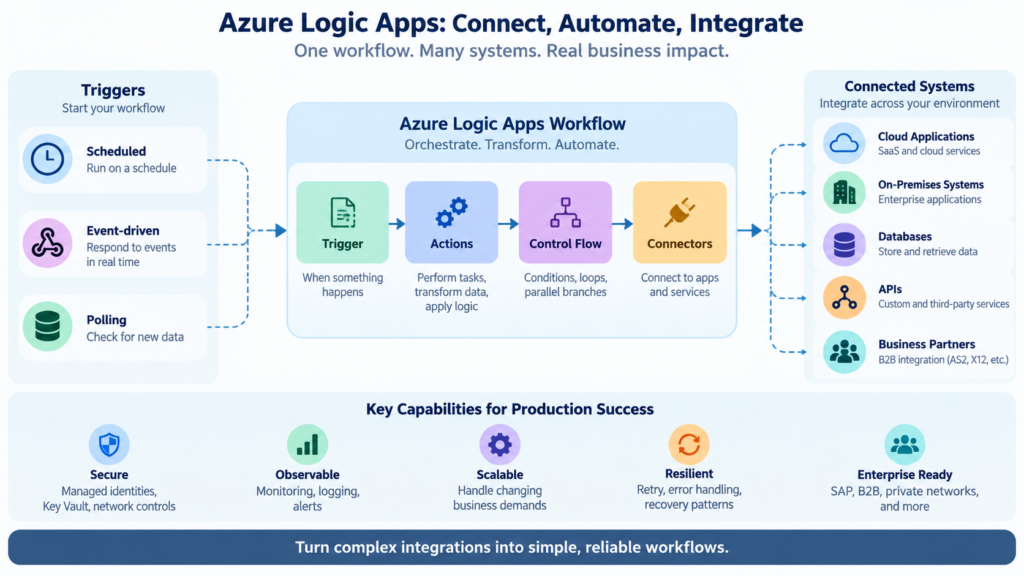
At its core, a Logic Apps workflow consists of three important building blocks: triggers, actions, and connectors.
Triggers
A trigger determines when a workflow starts.
Common trigger patterns include:
Polling triggers periodically check a service for new information. For example, a workflow might check a storage location or business application for newly created records.
Webhook or event-driven triggers respond when another service sends an event or callback. These are useful when applications need near-real-time processing without continuous polling.
Recurrence triggers execute workflows according to a schedule. Typical examples include nightly synchronization, periodic maintenance tasks, and scheduled reporting.
Choosing the appropriate trigger has operational consequences. Polling frequency can affect cost and service limits, while event-driven architectures can provide faster responses and reduce unnecessary executions.
Actions
Actions perform the actual work after a workflow starts.
A workflow can use actions to:
- Call REST APIs and Azure services
- Read or write application data
- Transform JSON, XML, CSV, or other payloads
- Send notifications
- Execute conditions and loops
- Invoke Azure Functions
- Process files and messages
- Coordinate multiple systems through sequential or parallel branches
A single Logic Apps workflow can therefore act as an orchestration layer across several applications.
Connectors
Connectors provide packaged integrations with external systems and services.
Logic Apps provides both built-in and managed connectors. Built-in operations execute more directly within the Logic Apps runtime, while managed connectors provide Microsoft-managed connectivity to numerous Azure, Microsoft, SaaS, and enterprise systems.
The distinction becomes particularly important when evaluating performance, networking, authentication, availability, and cost.
Consumption vs. Standard: Choosing the Right Hosting Model
One of the first architectural decisions is choosing between Logic Apps Consumption and Logic Apps Standard.
There is no universally better option. The appropriate model depends on workload characteristics, networking requirements, operational control, performance expectations, and cost.
Logic Apps Consumption
Consumption uses a multitenant hosting model where Azure manages the underlying infrastructure.
Its major advantage is simplicity. Administrators do not need to provision dedicated workflow compute capacity, and billing generally follows workflow execution and operation usage.
Consumption can work well for:
- Event-driven automation
- Sporadic workloads
- Relatively straightforward integrations
- Workloads where usage changes significantly over time
- Teams that want minimal infrastructure administration
The model is particularly attractive when workflows execute infrequently because organizations are not continuously paying for dedicated workflow compute.
Logic Apps Standard
Standard provides a single-tenant Logic Apps environment with greater control over runtime configuration, networking, development, and deployment.
It is often a better fit for enterprise workloads requiring:
- Private network connectivity
- More predictable performance
- Multiple workflows within a Logic App resource
- Local development and debugging
- Greater control over runtime configuration
- Stateful and stateless workflow options
- More advanced enterprise integration scenarios
Standard also changes the cost model because organizations provision hosting capacity rather than relying solely on per-execution consumption pricing.
For administrators, the decision should therefore consider the complete workload rather than simply comparing execution prices.
Stateful vs. Stateless Workflows
Logic Apps Standard introduces another important architectural decision: whether a workflow should be stateful or stateless.
Stateful workflows
Stateful workflows maintain execution state and workflow history. They are appropriate for processes that require durability, longer-running execution, detailed tracking, or recovery between operations.
Examples include order-processing workflows, multi-stage integrations, approval processes, and enterprise transactions.
Stateless workflows
Stateless workflows prioritize lower latency by keeping execution state primarily in memory during processing.
They are useful for short-running scenarios where fast request-response processing is more important than maintaining extensive workflow state.
The choice should be deliberate. Administrators should not automatically select stateless execution purely for performance without considering troubleshooting, durability, execution history, and recovery requirements.
Design Around Platform and Connector Limits
Every integration platform has operational limits, and Logic Apps is no exception.
Limits can apply to areas such as:
- Message and payload size
- Workflow execution duration
- Request-response operations
- Expression size
- Concurrency
- Loop execution
- Connector throttling
- API request rates
- Data retention
These limits can differ between Consumption and Standard and may also depend on the connector or operation being used.
For this reason, administrators should verify current Microsoft documentation during architecture and capacity planning rather than embedding assumptions about platform limits into an application design.
Large payloads deserve particular attention.
Instead of passing very large files through every workflow action, consider patterns where the payload remains in Azure Storage or another suitable repository and the workflow passes a reference to the data.
This can reduce memory pressure, execution overhead, and unnecessary data movement.
Enterprise B2B Integration
Logic Apps can also support business-to-business integration scenarios involving structured messages and trading partners.
Depending on the hosting model and architecture, enterprise integration capabilities can support technologies and standards such as:
- AS2
- X12
- EDIFACT
- RosettaNet
- XML schemas
- XSLT-based transformations
Integration artifacts can represent schemas, maps, certificates, partners, and agreements used during B2B message processing.
For organizations migrating from traditional enterprise integration platforms, these capabilities can provide a path toward cloud-based integration without abandoning established B2B standards.
However, administrators should evaluate the capabilities available for their chosen Logic Apps hosting model because artifact management and integration architecture can differ between Consumption and Standard.
Integrating SAP with Azure Logic Apps
SAP remains one of the most important enterprise integration scenarios.
Logic Apps can participate in workflows involving SAP interfaces such as IDocs and other supported operations, allowing organizations to connect SAP processes with Azure services and external applications.
A typical integration might look like this:
SAP → Logic Apps → validation/transformation → business application or Azure service
For high-volume or long-running processing, avoid unnecessarily holding synchronous connections open while downstream processing completes.
An asynchronous architecture is often more resilient:
Receive → acknowledge → queue/process → monitor → handle failure
For IDoc processing, workflows may need to separate packets into individual messages before validation, transformation, and routing.
Production SAP integrations should also consider:
- Retry behavior
- Duplicate processing
- Idempotency
- Connection availability
- Authentication
- Message correlation
- Large payload handling
- Failure recovery
The objective should not simply be to make SAP communicate with another application. The integration should remain recoverable and observable when one of the participating systems becomes unavailable.
Monitoring Logic Apps in Production
A workflow that executes successfully during testing is not automatically production-ready.
Administrators need visibility into failures, dependencies, latency, workflow executions, and downstream services.
Application Insights
For supported Logic Apps scenarios, Application Insights can provide valuable application-level telemetry and troubleshooting information.
Depending on configuration and hosting model, administrators can use telemetry to investigate areas such as:
- Failed operations
- Dependencies
- Exceptions
- Performance
- End-to-end transactions
- Execution behavior
The important principle is to configure observability before production incidents occur.
Azure Monitor and Diagnostic Settings
Diagnostic settings can route supported resource logs and metrics to destinations such as:
- Log Analytics workspaces
- Azure Storage
- Event Hubs
Log Analytics provides a centralized location for operational queries and alerting. Storage can support longer-term retention requirements, while Event Hubs can forward telemetry to external monitoring or SIEM platforms.
Administrators should also remember that diagnostic pipelines are not equivalent to synchronous transaction logging. Monitoring architecture should account for possible ingestion delays when designing operational alerts.
Build Actionable Alerts
Collecting logs without alerts simply creates a large repository of information.
Production environments should define alerts for meaningful conditions such as repeated workflow failures, abnormal execution latency, authentication problems, dependency failures, or unusual error rates.
Alerts should tell operations teams when intervention is required rather than generating noise for every minor event.
Security Best Practices
Security should be part of the workflow architecture from the beginning.
Prefer managed identities
Where supported, managed identities allow Logic Apps to authenticate to Azure resources without embedding passwords or credentials directly in workflows.
This reduces credential-management overhead and minimizes the risk associated with long-lived secrets.
Apply least privilege
A workflow should receive only the permissions required to perform its function.
Avoid assigning broad subscription or resource permissions when access to a specific resource is sufficient.
Protect secrets
When credentials or secrets cannot be eliminated, store and retrieve them using an appropriate secrets-management service such as Azure Key Vault rather than hardcoding them into workflow definitions.
Administrators should also review workflow inputs, outputs, run history, logging, and diagnostic data to ensure sensitive information is not unintentionally exposed.
Secure network paths
For workloads involving private enterprise systems, evaluate private networking, access restrictions, firewall policies, gateways, and private endpoints where supported.
Security architecture should cover both authentication and the network path used to reach the target system.
Build for Failure, Not Just Success
Enterprise integrations eventually encounter failures.
An API may become unavailable. A token can expire. A downstream application may throttle requests. SAP might be undergoing maintenance. A malformed message may enter the workflow.
Production workflows should anticipate these situations.
Useful resilience patterns include:
- Retry policies with appropriate backoff
- Explicit error-handling scopes
- Timeout handling
- Idempotent operations
- Message correlation
- Asynchronous processing
- Dead-letter or exception handling
- Alerts for repeated failures
Retry policies deserve particular care. Automatically retrying every failure can make an outage worse when a downstream system is already overloaded.
Administrators should distinguish between transient failures that are safe to retry and permanent failures that require intervention.
Administrator Checklist for Production Logic Apps
Before deploying an important Logic Apps workload, review the following areas:
Architecture: Choose Consumption or Standard based on actual workload requirements.
Networking: Confirm connectivity to private and public dependencies.
Security: Prefer managed identities, least privilege, and secure secret storage.
Observability: Configure Application Insights, Azure Monitor, diagnostic settings, and alerts as appropriate.
Limits: Validate current platform and connector limits against expected workloads.
Resilience: Implement retry, timeout, exception-handling, and recovery patterns.
Performance: Understand concurrency, payload size, connector behavior, and downstream system capacity.
Governance: Establish deployment standards, naming conventions, RBAC, configuration management, and operational ownership.
Testing: Test failure scenarios—not only successful executions.
This last point is particularly important. A production integration should be tested when dependencies are slow, unavailable, throttled, or returning unexpected data.
Final Thoughts
Azure Logic Apps can serve as much more than a simple workflow automation service.
Used effectively, it can become an important integration layer connecting cloud services, SaaS applications, APIs, enterprise systems, B2B partners, and private workloads.
The visual designer and extensive connector ecosystem make workflows relatively easy to build. The more difficult challenge is operating those integrations reliably at enterprise scale.
That requires administrators and architects to think beyond the workflow designer.
“`
Choose the hosting model deliberately. Design around platform and connector limits. Use secure authentication. Build observability before production. Treat failures as expected operational events rather than exceptional circumstances. And verify architecture decisions against current Azure documentation as the platform evolves.
When those disciplines are applied consistently, Azure Logic Apps can provide a scalable and maintainable foundation for enterprise automation and integration.

Cybersecurity Architect | Cloud-Native Defense | AI/ML Security | DevSecOps | Certified ISO/IEC 42001:2025 AIMS Lead Auditor
With over 23 years of experience in cybersecurity, I specialize in designing and building resilient, zero-trust digital ecosystems across multi-cloud environments (AWS, Azure, GCP) and Kubernetes platforms (EKS, AKS, GKE).
My journey began in network security—firewalls, IDS/IPS—and expanded into Linux/Windows hardening, Identity and Access Management (IAM), and DevSecOps automation using Terraform, GitLab CI/CD, and policy-as-code technologies such as OPA and Checkov.
Today, my focus extends to AI governance and AI/ML security, supported by my certification as an ISO/IEC 42001:2025 Artificial Intelligence Management System (AIMS) Lead Auditor. I help organizations establish governance, risk management, security, and assurance practices for responsible AI adoption while aligning AI initiatives with organizational and regulatory requirements.
From a technical security perspective, I focus on MLSecOps, protecting AI/ML models and pipelines against adversarial threats using technologies such as Robust Intelligence and Microsoft Counterfit. I also integrate AISecOps capabilities for intelligent threat detection and investigation, leveraging platforms such as Darktrace and Microsoft Security Copilot, while automating incident response through forensics-driven workflows with Elastic SIEM and TheHive.
Whether it’s hardening cloud-native infrastructure, embedding security into CI/CD pipelines, governing enterprise AI adoption, or safeguarding AI systems, I bridge the gap between cybersecurity, AI governance, and innovation—ensuring that security and trust scale with technological velocity.
Let’s connect and discuss the future of secure, governed, and intelligent infrastructure.