
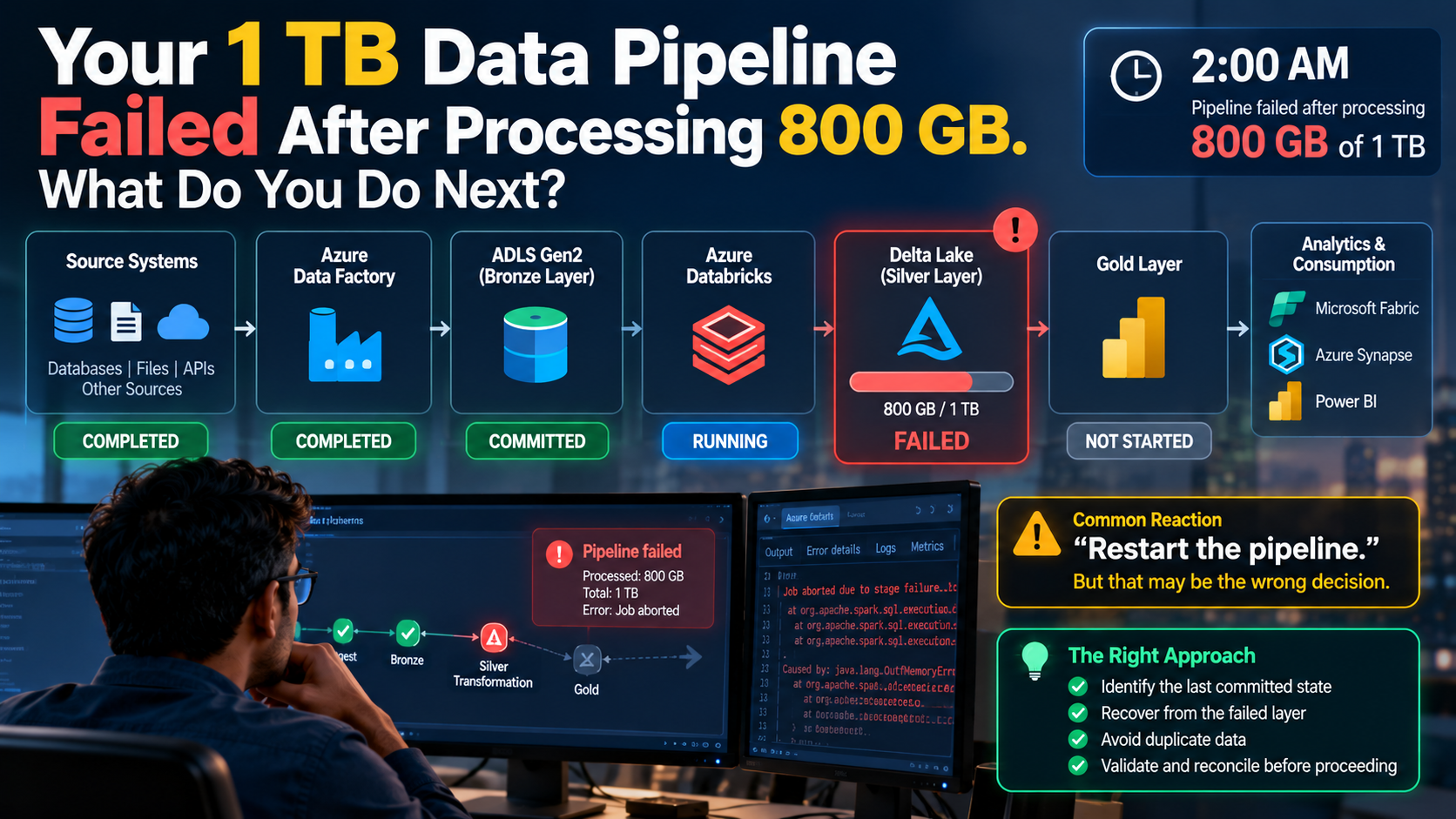
Your 1 TB Data Pipeline Failed After Processing 800 GB. What Do You Do Next?
Classic Data Engineer Problem and how to address that
It is 2:00 AM.
Your nightly Azure data pipeline processes approximately 1 TB of data. After four hours, 800 GB has been processed—and the Silver-layer transformation fails.
The business expects refreshed data by 6:00 AM.
What do you do?
Restart the entire pipeline? Rerun the failed activity? Delete the partial output? Continue from a checkpoint?
Before doing any of these, there is a more important question:
What was successfully committed, and what can be safely replayed?
This scenario exposes four concepts every production Data Engineer should understand:
Restartability. Idempotency. Commit boundaries. Auditability.
The Production Scenario
Consider this simplified Azure architecture:
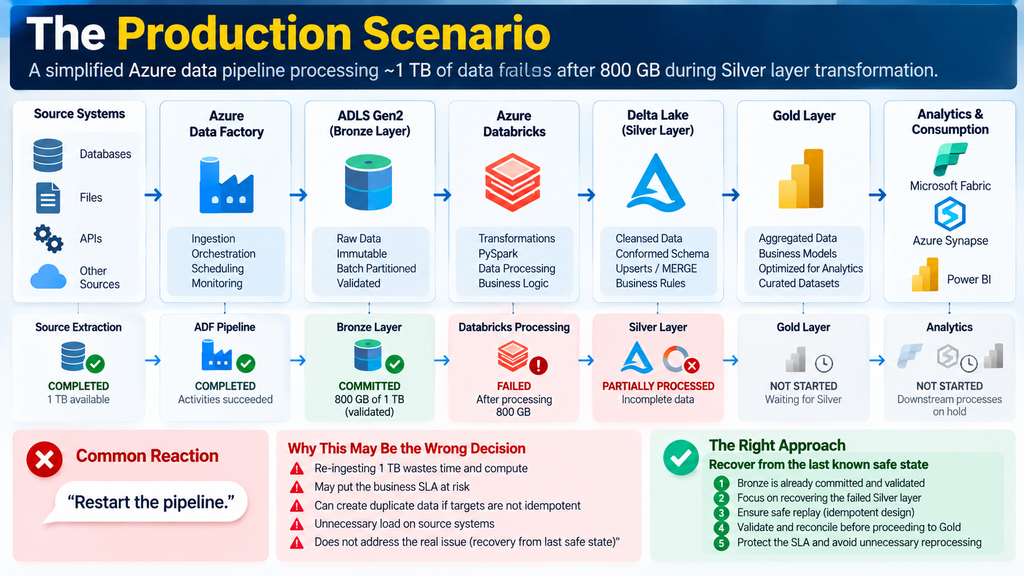
At the time of failure:
Bronze  → COMMITTED ✓
Silver  → PARTIALLY PROCESSED ✕
Gold    → NOT STARTED
A common reaction is:
“Restart the pipeline.”
That may be exactly what you should not do.
If Bronze is complete, validated and committed, re-ingesting 1 TB wastes time and compute—and may put the SLA at further risk.
The objective should be to recover from the last known safe state.
1. Establish the Last Commit Boundary
A successful activity and a successfully committed dataset are not necessarily the same thing.
A production pipeline should have explicit commit boundaries:
Batch Started
     ↓
Bronze Processing
     ↓
Bronze Validation
     ↓
BRONZE COMMITTED ✓
     ↓
Silver Processing
     ↓
Silver Validation
     ↓
SILVER COMMITTED
     ↓
Gold Processing
     ↓
Gold Validation
     ↓
GOLD COMMITTED
     ↓
Publish
In our scenario, Bronze is already committed.
That gives us a deterministic recovery point.
The first principle is therefore:
Restart from the last validated commit boundary—not automatically from the beginning.
2. Never Assume Partial Data Is Valid Data
Suppose Silver already contains records for the current batch.
That does not mean Silver completed successfully.
The job may have written 60% of the records before failing.
This is why I prefer explicit batch-control metadata:
BatchID
PipelineName
Layer
StartTime
EndTime
Status
CommitStatus
SourceCount
TargetCount
RejectedCount
WatermarkStart
WatermarkEnd
PipelineRunID
ErrorMessage
For example:
Batch:   20260925

Bronze:
Status       = SUCCESS
CommitStatus = COMMITTED

Silver:
Status       = FAILED
CommitStatus = NOT_COMMITTED
Now the recovery decision is based on platform state rather than assumptions.
3. Make the Pipeline Safe to Replay
The next question is:
Can Silver be rerun without creating duplicates or inconsistent data?
This is idempotency.
An idempotent pipeline is designed so that replaying the same logical batch still produces the correct target state.
A blind append can be dangerous:
INSERT INTO silver_transactions
SELECT *
FROM bronze_transactions
WHERE BatchID = '20260925';
If the first execution partially succeeded, rerunning it may duplicate data.
Depending on the data semantics, a Delta Lake upsert may be more appropriate:
MERGE INTO silver_transactions AS target
USING staged_transactions AS source

ON target.TransactionID = source.TransactionID

WHEN MATCHED THEN
    UPDATE SET *

WHEN NOT MATCHED THEN
    INSERT *;
MERGE is not automatically the correct solution for every workload. Business keys, deletes, table size, write patterns and performance requirements still matter.
The broader principle is more important:
Replay behaviour should be designed before the failure occurs.
4. Treat Watermarks Carefully
Watermark management is another common recovery problem.
Consider this design:
Read Source
     ↓
Write Bronze
     ↓
Advance Watermark
     ↓
Process Silver
     ↓
FAIL
Now the source watermark says the data was processed, while Silver remains incomplete.
That creates ambiguous operational state.
A cleaner design separates checkpoints by processing boundary:
Source
   ↓
Bronze Ingestion
   ↓
Validation
   ↓
BRONZE COMMIT
   ↓
Bronze Checkpoint
   ↓
Silver Processing
   ↓
Validation
   ↓
SILVER COMMIT
   ↓
Silver Checkpoint
A watermark should have a precise meaning.
Do not use one ambiguous checkpoint to represent multiple processing stages.
5. Reconcile Before Publishing
Suppose Silver is replayed successfully.
Are we finished?
Not yet.
Before committing and publishing the recovered batch, I would validate metrics such as:
- Expected vs processed record count
- Duplicate business keys
- Rejected records
- NULL violations
- Minimum and maximum dates
- Distinct business keys
- Financial/control totals where applicable
For example:
Expected Records    = 428,500,000
Processed Records   = 428,500,000
Duplicate Keys      = 0
Rejected Records    = 0
Reconciliation      = PASSED
Only then:
Silver → COMMITTED ✓
        ↓
Gold Processing
        ↓
Validation
        ↓
Gold → COMMITTED ✓
        ↓
Publish
This distinction matters:
Pipeline success proves execution completed. Reconciliation provides evidence that the data is complete and consistent with the checks you defined.
6. Do Not Expose Partial Data to Consumers
A failed batch becomes significantly more serious if incomplete data is already visible to dashboards or downstream systems.
Prefer:
Process
   ↓
Validate
   ↓
Reconcile
   ↓
Commit
   ↓
Publish
   ↓
Consumers
rather than:
Start Writing
   ↓
Consumers Query Data
   ↓
Pipeline Fails
   ↓
Consumers See Partial State
Processing state and published state should be deliberately separated.
How I Would Recover This Pipeline
Given:
Bronze → COMMITTED
Silver → FAILED / NOT COMMITTED
Gold   → NOT STARTED
my recovery flow would conceptually be:
Verify Bronze Commit
        ↓
Identify Failed Silver Batch
        ↓
Assess Partial Silver Output
        ↓
Clean Up or Safely Replay
        ↓
Rerun Silver from Bronze
        ↓
Validate
        ↓
Reconcile
        ↓
Commit Silver
        ↓
Run Gold
        ↓
Validate + Reconcile
        ↓
Commit Gold
        ↓
Publish
The exact recovery mechanism depends on how the target writes are implemented.
I would not rerun Silver simply because the orchestration platform allows me to click “rerun.”
I would rerun it only after establishing that replay is safe.
The Four Engineering Principles Behind Recovery
Restartability
Can processing resume from a known safe point instead of starting from zero?
Idempotency
Can the same logical batch be replayed without producing an incorrect additional effect?
Commit Boundaries
Can we clearly distinguish between processing and successfully completed, validated data?
Auditability
Can we reconstruct what happened for a specific batch, including counts, checkpoints, status and errors?
Together:
Restartability
      +
Idempotency
      +
Commit Boundaries
      +
Auditability
      ↓
Predictable Recovery
What I Expect a Production Platform to Tell Me
During an incident, I want these answers quickly:
| Question | Required Information |
|---|---|
| Which batch failed? | Batch ID / Run ID |
| Where did it fail? | Pipeline stage |
| What completed? | Commit status |
| Was partial data written? | Processing status |
| What checkpoint was used? | Watermark / batch boundary |
| Can it be replayed safely? | Recovery strategy |
| Is the recovered data complete? | Reconciliation results |
| Was incomplete data published? | Publication status |
If engineers need an hour of manual log analysis to answer these questions, the platform’s operational design can be improved.
The Interview Version of This Scenario
An interviewer may ask:
“A 1 TB ADF and Databricks pipeline fails after processing 800 GB. How would you restart it?”
Do not jump immediately to:
“I would rerun the failed activity.”
First establish:
- Which stage failed?
- What was committed?
- Is partial output present?
- Is the target append, overwrite or merge?
- Is the operation idempotent?
- Did the watermark advance?
- Is there a batch identifier?
- Was incomplete data exposed downstream?
- How will recovery be reconciled?
That demonstrates an understanding of failure semantics, not just orchestration.
A Simple Recovery Framework
When a production pipeline fails, I use this sequence:
IDENTIFY
What failed?
     ↓
ISOLATE
What completed?
     ↓
VERIFY
What was committed?
     ↓
ASSESS
Is partial data present?
     ↓
CHECK
Did checkpoints advance?
     ↓
DECIDE
What is the safest restart point?
     ↓
REPLAY
Can it run idempotently?
     ↓
RECONCILE
Is the recovered data complete?
     ↓
PUBLISH
Expose only validated data.
Final Thought
Production pipelines will fail.
The engineering objective is not to pretend otherwise.
The real question is:
When the pipeline fails halfway through, can we identify exactly what completed, restart from a safe point, prevent duplicate or inconsistent data, validate the recovery and still protect the business SLA?
A pipeline that succeeds is useful.
A pipeline that can fail predictably and recover safely is production-ready.
For Azure Data Engineers, restartability, idempotency, commit boundaries and reconciliation are not optional operational details.
They are part of the architecture.
Frequently Asked Questions
What is idempotency in a data pipeline?
Idempotency means the same logical batch can be processed again without producing an incorrect additional effect, such as duplicate records.
What is pipeline restartability?
Restartability is the ability to resume or replay processing from a known safe state instead of repeating all previously completed work.
When should a pipeline watermark be updated?
A watermark should advance according to a clearly defined successful commit boundary. Its meaning should be explicit so incomplete processing is not mistaken for completed processing.
Should I rerun an entire ADF pipeline after a failure?
Not automatically. First determine what was successfully committed, whether partial output exists and whether the affected stages can be safely replayed.

Cybersecurity Architect | Cloud-Native Defense | AI/ML Security | DevSecOps | Certified ISO/IEC 42001:2025 AIMS Lead Auditor
With over 23 years of experience in cybersecurity, I specialize in designing and building resilient, zero-trust digital ecosystems across multi-cloud environments (AWS, Azure, GCP) and Kubernetes platforms (EKS, AKS, GKE).
My journey began in network security—firewalls, IDS/IPS—and expanded into Linux/Windows hardening, Identity and Access Management (IAM), and DevSecOps automation using Terraform, GitLab CI/CD, and policy-as-code technologies such as OPA and Checkov.
Today, my focus extends to AI governance and AI/ML security, supported by my certification as an ISO/IEC 42001:2025 Artificial Intelligence Management System (AIMS) Lead Auditor. I help organizations establish governance, risk management, security, and assurance practices for responsible AI adoption while aligning AI initiatives with organizational and regulatory requirements.
From a technical security perspective, I focus on MLSecOps, protecting AI/ML models and pipelines against adversarial threats using technologies such as Robust Intelligence and Microsoft Counterfit. I also integrate AISecOps capabilities for intelligent threat detection and investigation, leveraging platforms such as Darktrace and Microsoft Security Copilot, while automating incident response through forensics-driven workflows with Elastic SIEM and TheHive.
Whether it’s hardening cloud-native infrastructure, embedding security into CI/CD pipelines, governing enterprise AI adoption, or safeguarding AI systems, I bridge the gap between cybersecurity, AI governance, and innovation—ensuring that security and trust scale with technological velocity.
Let’s connect and discuss the future of secure, governed, and intelligent infrastructure.